Understanding Prompts
Your Secret Ingredient for Better Results
You don't need to be a tech expert to get the most out of Lafai. This guide explains everything in plain language.
What is a Prompt?
Think of a prompt like placing an order at a restaurant. When you tell the waiter what you want, how you want it cooked, and what you're allergic to — that's a prompt. It's simply a set of instructions.
A prompt is the instruction you give the AI so it knows what to look for and how to answer.
Without a prompt, the AI wouldn't know if you want a quick summary, a deep dive into every ingredient, or an analysis of pet food.
Why Does Lafai Use Prompts?
Lafai uses advanced AI (Google Gemini) to analyze your food. The AI is incredibly powerful, but it needs clear instructions to give you the right answer.
Different people have different needs. A parent checking snacks for their kids needs different information than someone tracking sodium for heart health. The same if you are a runner, pet owner, or simply wanting to lose some weight.
The prompt is what makes Lafai's analysis personal and relevant to you.
The Built-In Prompts — Ready to Use
Lafai comes with 7 carefully designed prompts so you can start scanning immediately.
- 🔬 General Ingredient Check — The all-rounder. Gives you a full breakdown of ingredients, nutrition, and whether the product is a good fit for you.
- ⚡ Quick Score — In a hurry? Get a green/amber/red traffic-light score and one key takeaway.
- 🎓 Youth & Student Realistic Check — A more lenient, realistic nutritional assessment designed for teenagers and young adults, allowing for flexible diets and higher metabolic thresholds.
- 🔬 Ingredient & Additive Deep Dive — Comprehensive breakdown of every ingredient, with deep safety analysis of any additives, preservatives, and artificial components.
- 🍎 Unlabeled Food Analysis — No label? No problem. Point your camera at a fruit, a cooked meal, or any food and get an analysis.
- 🍽️ Meal Completeness — Is this enough for lunch? Find out if a product is a complete meal or what to pair it with.
- 🐾 Pet Food Analysis — Scan your pet's food to check ingredient quality and safety for cats, dogs, and other animals.
How to Create Your Own Prompt
You don't need any technical knowledge. If you can describe what you want to know about a food product, you can write a prompt.
- Step 1: Open the Prompts tab in the app
- Step 2: Tap the + button to create a new prompt
- Step 3: Give your prompt a name (e.g., "My Low-Sugar Check")
- Step 4: Write what you want the AI to look for (in your own words, in any language)
- Step 5: Save and start scanning!
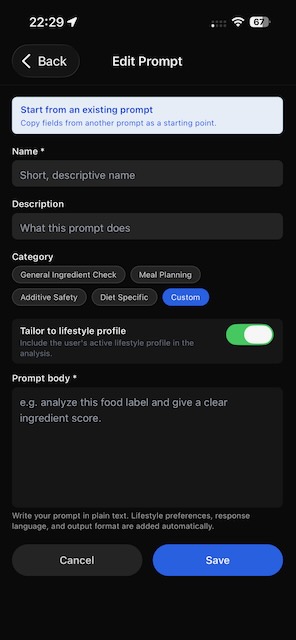
Tips for writing good prompts:
- Be specific: "Tell me about sugar and sodium levels" works better than "Analyze this".
- Ask for what matters to you: "Is this suitable for someone with high blood pressure?"
- Use your language: You can write in any language — the AI will respond in the same language.
Examples of Custom Prompts
Prompts can be as simple or as complex as you need them to be. A complex prompt gives the AI a specific structure and format to follow, similar to our built-in prompts. Below are two examples of complex custom prompts:
📋 Restaurant Menu Analysis
🌱 Vegan Ingredient Scan
Short Prompts & Lifestyle Profile
You can also create short, simple prompts. These can be used as stand-alone prompts, integrated into another complex prompt, or even pasted directly into your Lifestyle Profile in the app:
👶 Baby Food Check
💪 Gym & Protein Focus
🫀 Heart-Healthy Check
How to Copy and Adapt an Existing Prompt
- Copy a built-in prompt: Built-in prompts cannot be edited directly (they're maintained by the app), but you can use them as inspiration to create a new one with your own twist.
- Duplicate a custom prompt: Tap on any prompt → copy its text → create a new prompt → paste and modify to fit your needs.
- Adapting tips: Change the focus area, add your personal dietary restrictions, switch the language, or combine ideas from multiple prompts.